Contributing
This site was created to be open for contributions from the open-source
community. This is achieved by commiting files to Github in .rst format.
In order to contribute to this site, the following is needed:
- Github account
- Github client
- Text editor
- (optional) Local install of Sphinx
By leveraging Github, multiple people can write documents for the site without having to use a platform like Wordpress using many different accounts.
Architectures
N4D chapters are based on architectures. At the start these are:
- Cloud
- Datacenter
- Design
- Networking
- Security
- Services
These are quite self-explanatory but the following adds more context to each architecture:
Cloud - Focus on networking in the public cloud, such as AWS, Azure and GCP.
Datacenter - Focus on on-premises datacenter technologies and design.
Design - Focus on networking design principles such as scalability, fault domains and more.
Networking - Focus on “standard” networking such as LAN and WAN.
Security - Focus on security such as firewalls, IPSec and more.
Services - Focus on networking related services such as DNS and DHCP.
N4D structure
N4D, using Read the Docs, thus using Sphinx as the backend, has the following structure setup:
docs- All the documents go here_static- All static content, such as images, go here
In order to keep things sorted, there are also subdirectories based on
different architectures, for the docs directory these are:
- Cloud (
docs/cloud) - Datacenter (
docs/datacenter) - Design (
docs/design) - Networking (
docs/networking) - Security (
docs/security) - Services (
docs/services)
The _static directory also has the same layout:
- Cloud (
docs/_static/cloud) - Datacenter (
docs/_static/datacenter) - Design (
docs/_static/design) - Networking (
docs/_static/networking) - Security (
docs/_static/security) - Services (
docs/_static/services)
Workflow
This site uses a forking workflow, meaning that each contributor forks the official repository to create their own server-side copy of the project. This allows the maintainers to keep write access for the maintainers and instead approving incoming Pull Requests.
Setting up the environment
The first step to contributing is to create a fork of the N4D repository.
This is done by clicking the fork icon in the top right corner.

When this is done, clone the forked repo to a local directory.
daniel@demo:~/n4d-fork$ git clone https://github.com/ddib-ccde/n4d.git
Cloning into 'n4d'...
remote: Counting objects: 22, done.
remote: Compressing objects: 100% (16/16), done.
remote: Total 22 (delta 2), reused 18 (delta 1), pack-reused 0
Unpacking objects: 100% (22/22), done.
When using the forking workflow, the upstream repository needs to be added.
git remote add upstream https://github.com/network4dev/n4d.git
The command git remote -v can be used to verify the origin and upstream
repo.
daniel@demo:~/n4d-fork/n4d$ git remote -v
origin  https://github.com/ddib-ccde/n4d.git (fetch)
origin  https://github.com/ddib-ccde/n4d.git (push)
upstream        https://github.com/network4dev/n4d.git (fetch)
upstream        https://github.com/network4dev/n4d.git (push)
Contributing text
Before committing any text, it’s recommended to make sure that your local copy of the repo is up to date. This is accomplished by fetching from the upstream master and merging it with your local copy.
If you are already synched, it will look like in the demo below.
daniel@demo:~/n4d-fork/n4d$ git fetch upstream
From https://github.com/network4dev/n4d
* [new branch]      master     -> upstream/master
daniel@demo:~/n4d-fork/n4d$ git checkout master
Already on 'master'
Your branch is up to date with 'origin/master'.
daniel@demo:~/n4d-fork/n4d$ git merge upstream/master
Already up to date.
Before working on a document, create a branch and name it appropriately,
such as osi-model-text with git checkout -b osi-model-text.
Using your text editor, edit the file and then commit the changes
git commit -a -m "Wrote about the OSI model. Then the commit
is pushed to origin, using git push origin osi-model-text. When
pushing to Github, you will need to supply your credentials.
The demo below shows an update to the scrollbar for N4D:
daniel@demo:~/n4d-fork/n4d$ git checkout -b fix-issue-5-edit-scrollbar
Switched to a new branch 'fix-issue-5-edit-scrollbar'
daniel@demo:~/n4d-fork/n4d$ git commit -a -m "Updated index.rst to set caption to main page"
[fix-issue-5-edit-scrollbar d5ac8bf] Updated index.rst to set caption to main page
1 file changed, 1 insertion(+), 1 deletion(-)
daniel@demo:~/n4d-fork/n4d$ git push origin fix-issue-5-edit-scrollbar
Username for 'https://github.com': ddib-ccde
Password for 'https://ddib-ccde@github.com':
Counting objects: 3, done.
Delta compression using up to 2 threads.
Compressing objects: 100% (3/3), done.
Writing objects: 100% (3/3), 324 bytes | 324.00 KiB/s, done.
Total 3 (delta 2), reused 0 (delta 0)
remote: Resolving deltas: 100% (2/2), completed with 2 local objects.
To https://github.com/ddib-ccde/n4d.git
* [new branch]      fix-issue-5-edit-scrollbar -> fix-issue-5-edit-scrollbar
Once the commit has been pushed to your forked repo at Github, you
can submit a PR to upstream. By navigating to your forked repo at Github,
Github will see that you have pushed a new branch, in order to create a
PR from the branch, click on compare & pull request.

When this is done, it will look like the picture below.
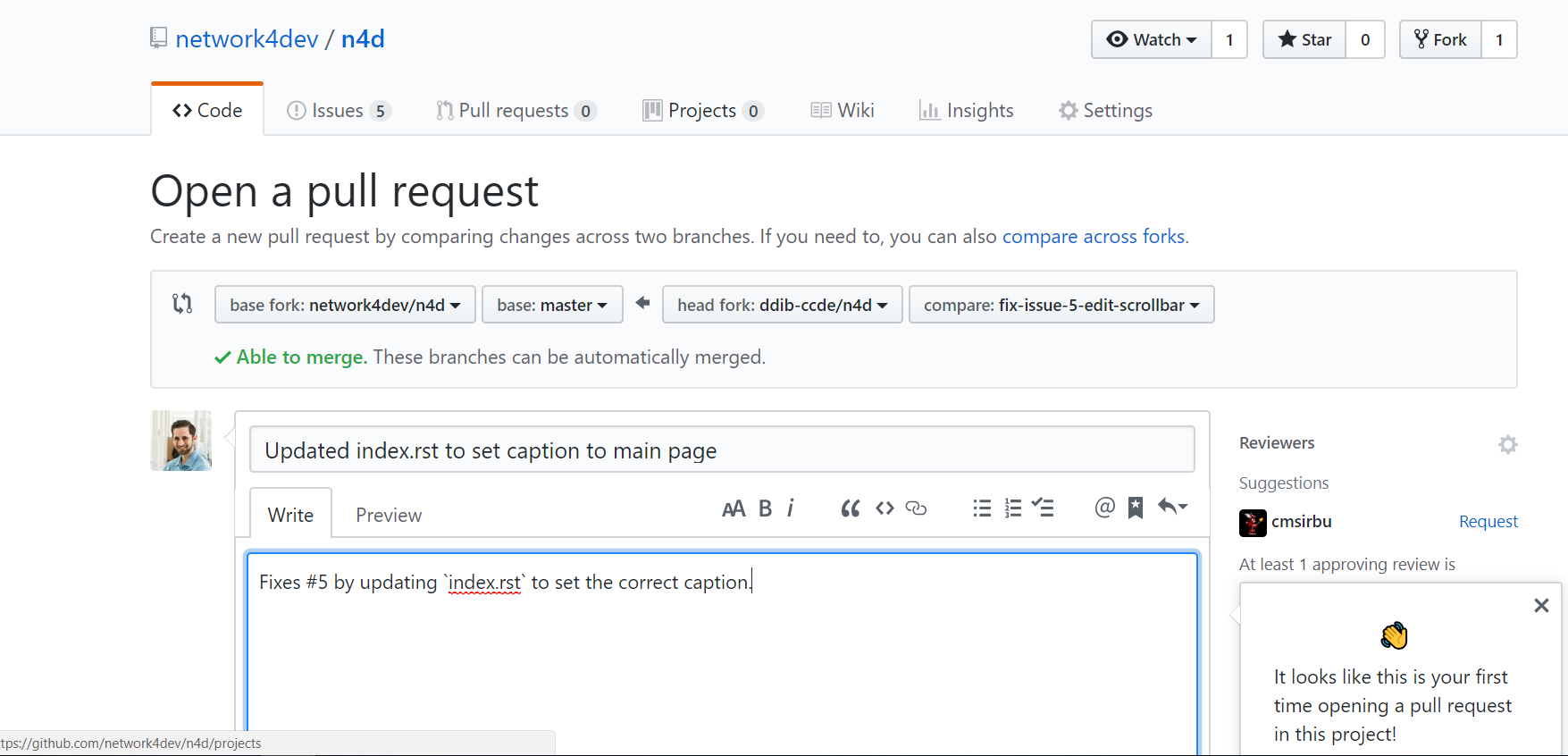
If this PR is a fix to an issue, this can be indicated in the text, as it is in this example with “Fixes #5”. Issues can be referenced by putting the hash sign followed by the number of the issue.
When the PR has been opened, it will look like the picture below.
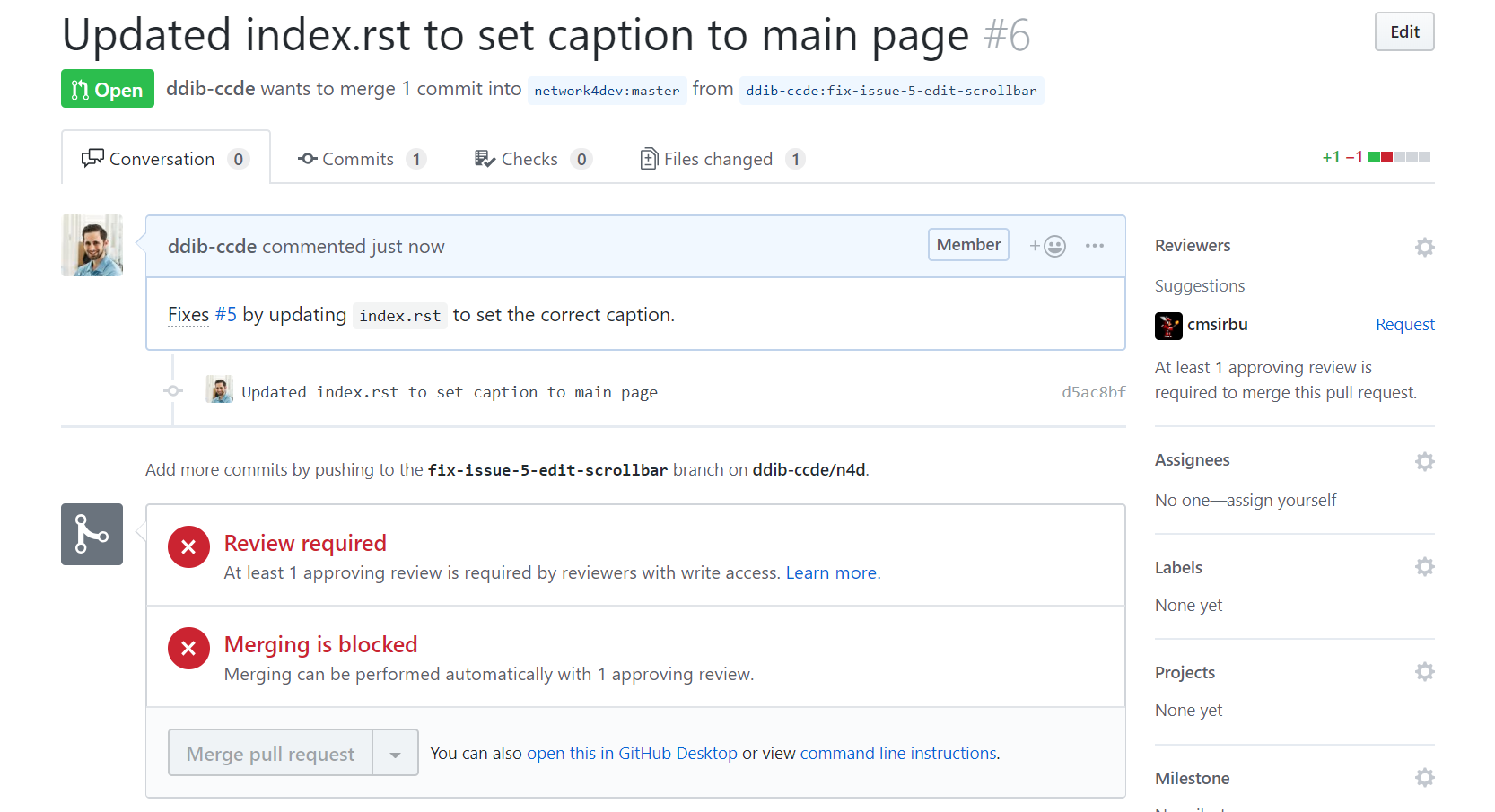
The PR will then have to be approved by one of the maintainers before it will be merged to upstream.
Brief intro to reStructuredText
reStructuredText (reST) is the default plaintext markup language used by Sphinx. People familiar with Markdown will recognize some of the syntax.
First in every .rst document is the header. This is created by using
equal sign above and below the text, like below:
=================
This is a heading
=================
Inline markup
- one asterisk: *text* for italics
- two asterisks: **text** for boldface
- backquotes: ``text`` for code samples
Below is a sample of what it looks like:
- italics
- boldface
code sample
Hyperlinks
To put a hyperlink in the text, use the following syntax:
`Link text <https://domain.invalid/>`_
Images
Images are referenced with the image directive, like below:
.. image:: static_/my_image.png
Remember to put a blank line before and after this directive.
Code samples
It is supported to highlight different code examples, for example output from console with:
.. code-block:: console
It looks like the output below:
daniel@demo:~/n4d-fork/n4d/docs$ ls
audience.rst  changelog.rst  contributing.rst  design  infrastructure.rst  networking  services
_build        cloud          datacenter        images  introduction.rst    security    _static
It is also possible to highlight programming languages such as Python.
For a more complete guide, refer to reStructuredText Primer
To test your syntax, it’s possible to use Online reStructuredText editor
If unsure of the syntax, check one of the existing files in the docs directory.